ThinkVolt at Solar & Storage Expo Pakistan 2026: Connecting with Pakistan’s Energy Storage Market
2026-07-23

No, you do not necessarily need to charge a home battery to 100% every day. The appropriate charging target depends on battery chemistry, the manufacturer's approved operating range, and how much stored energy your household needs for daily use and backup power.
For some lithium iron phosphate (LiFePO4 or LFP) systems, reducing time at a high state of charge (SOC) may limit aging stress. Others need specified full-charge events for balancing or SOC synchronization. Follow your model manuals—not a universal percentage rule.
Daily charging to a displayed 100% may be appropriate when permitted and needed. But reaching high SOC differs from remaining there for hours.
Home Battery Use | Practical Approach |
Routine solar self-consumption | Consider an approved lower limit when it still covers typical evening and overnight loads. |
Frequent or unpredictable outages | Prioritize sufficient stored energy and an appropriate backup reserve. |
Manufacturer-specified maintenance | Complete required full-charge, balancing, or synchronization procedures as instructed. |
If your battery exceeds normal demand, a lower target may reduce high-SOC exposure. During frequent outages, extra stored energy may matter more. Never override the battery management system (BMS).
Before changing a maximum charge SOC, verify the exact battery model, approved SOC window, BMS requirements, inverter compatibility, and setting permissions. A target that is available on one system may be unsupported—or differently defined—on another.
Identify LFP, nickel manganese cobalt (NMC), or another chemistry. Use the latest model manual, and confirm that any combination of modules and firmware is approved.
Check | What to Confirm |
Approved SOC window | Permitted upper and lower operating limits and how displayed SOC is defined |
BMS maintenance | Whether balancing or SOC synchronization needs a particular charging procedure |
Inverter compatibility | Exact inverter model, firmware, voltage requirements, and communication protocol |
Charge-limit control | Whether a user-adjustable maximum charge SOC is actually available |
Access permissions | Whether changing it requires an authorized installer |
ThinkVolt model note: Published specifications for the TVES-48100W and TVES-48100R list a 15%–95% SOC operating range. This does not authorize arbitrary settings within that range; the latest approved datasheet and configuration govern. Another system may define displayed 100% differently.
There is no best percentage that applies to every home battery. Treat 80%, 90%, and 100% as charging targets to compare only if your particular system supports them. Consider consumption, outages, and prescribed maintenance.
Charge Target | When It May Fit | Main Trade-Off |
80% | An approved setting where normal loads need relatively little stored energy | Less high-SOC exposure, but less energy available after sunset or during an outage |
90% | An approved compromise when a little more daily capacity is valuable | Greater energy availability, though still not a universally optimal target |
100% | A permitted target for maximum backup readiness or required maintenance | More available energy, with potentially longer exposure to high SOC |
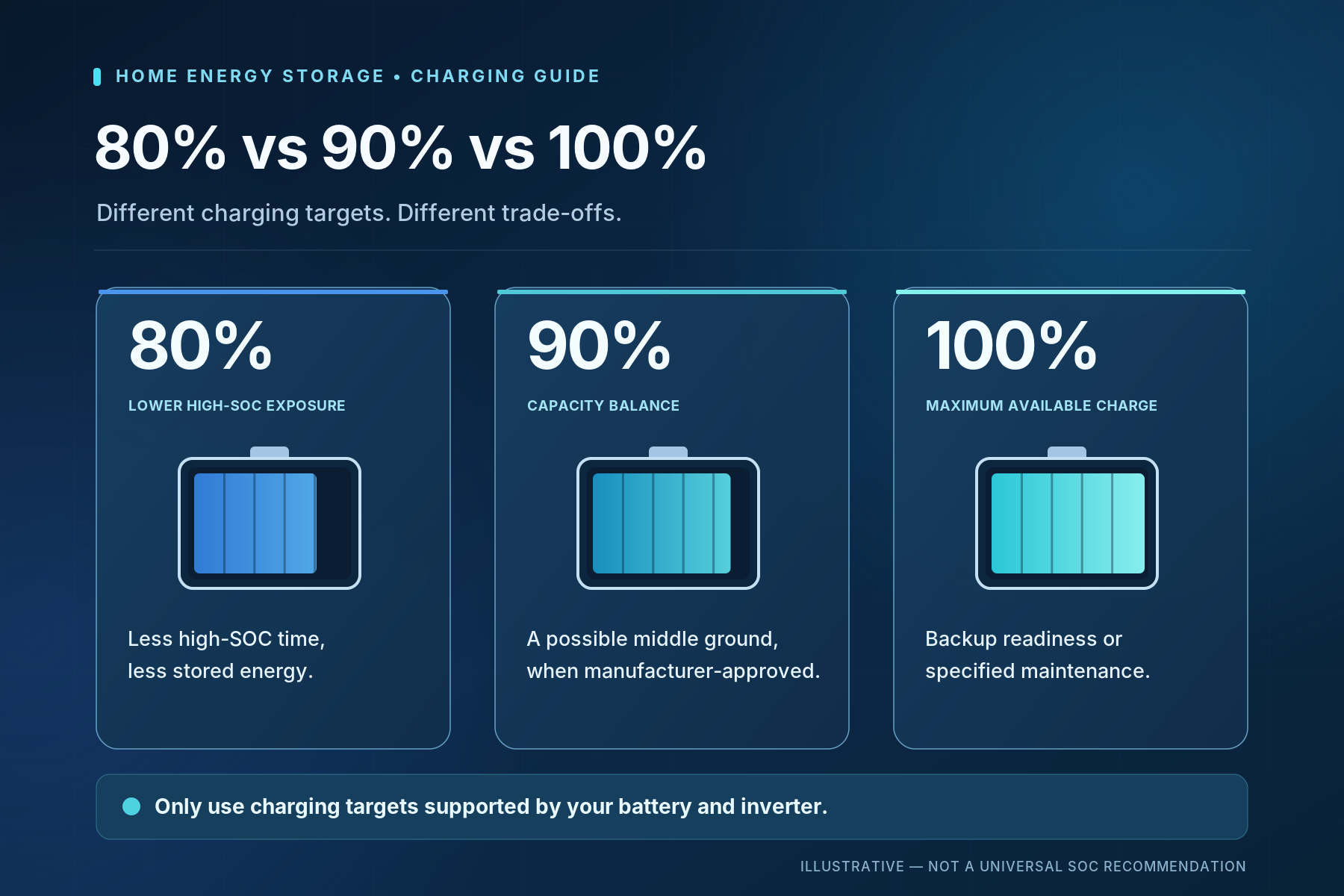
If substantial charge remains each morning, you may not need a daily full charge. Review usage across representative days, including cloudy weather.
A high approved target can be useful before a forecast outage or when the manufacturer requires a full-charge maintenance event. Some systems perform balancing or SOC synchronization only under specific upper-charge conditions; repeatedly avoiding those conditions may therefore be counterproductive. Follow the battery manual rather than inventing a weekly or monthly full-charge rule.
A lower upper SOC normally means less energy available to your AC loads, assuming the same lower discharge threshold. You can estimate this trade-off before selecting a charging strategy.
Estimated AC energy (kWh) = Reference battery energy (kWh) × (Maximum SOC − Minimum SOC) × Battery-to-AC efficiency
Use SOC fractions—for example, 80% becomes 0.80. The reference energy must be defined consistently. Do not subtract an SOC window already included in usable capacity.
This is a hypothetical calculation, not a test of any ThinkVolt product. Assume a reference battery energy of 5.12 kWh, a 20% minimum discharge SOC, a constant 90% battery-to-AC discharge-path efficiency, and an approximately linear relationship between displayed SOC and remaining battery energy. The 90% figure is illustrative; it is not a claimed battery efficiency or round-trip efficiency.
Maximum SOC | Battery Energy Above 20% SOC | Estimated Energy Delivered to AC Loads |
80% | 3.07 kWh | 2.76 kWh |
90% | 3.58 kWh | 3.23 kWh |
100% | 4.10 kWh | 3.69 kWh |
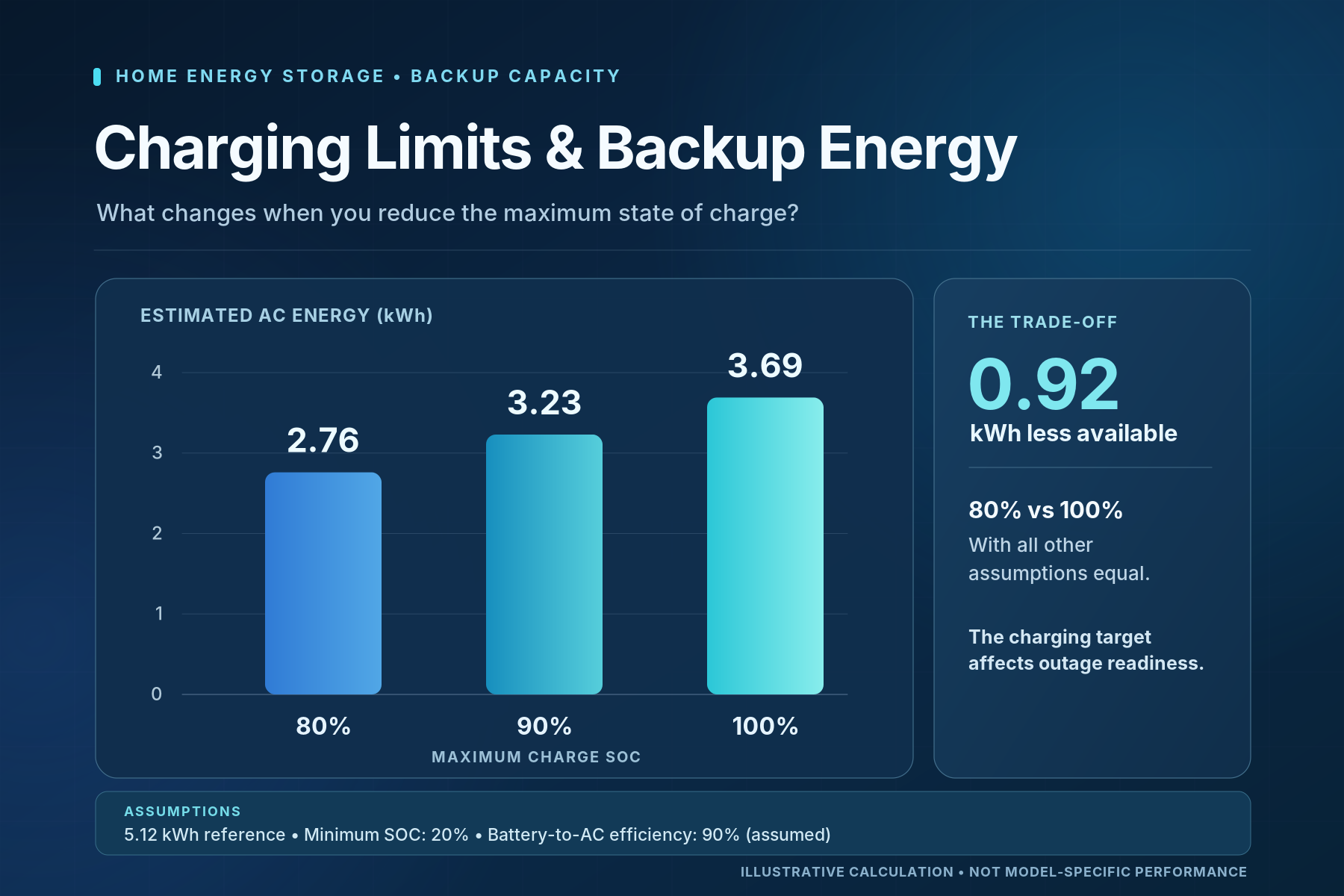
Here, 80% instead of 100% provides approximately 0.92 kWh less AC energy—roughly 1.8 theoretical hours at a steady 0.5 kW load.
Results vary with SOC definitions, usable capacity, efficiency, temperature, and load. The table does not imply that a ThinkVolt model limited to 95% can be set to 100%.
For broader capacity planning, see How Many Batteries Do You Need for Whole-Home Backup?.
The BMS protects battery cells, the inverter or charger regulates the electrical charging process, and an energy management system (EMS), when present, can schedule energy use. Their roles overlap in operation but are not interchangeable.
Component | Primary Responsibility | Charging Implication |
BMS | Monitors cells, current, temperature, and protective conditions | May communicate permitted limits or restrict charging |
Inverter/charger | Converts power and executes supported charge control | Applies charging commands subject to battery and equipment restrictions |
EMS | Coordinates solar, grid, tariffs, household demand, and backup priorities | Can request charging at certain times or targets where supported |
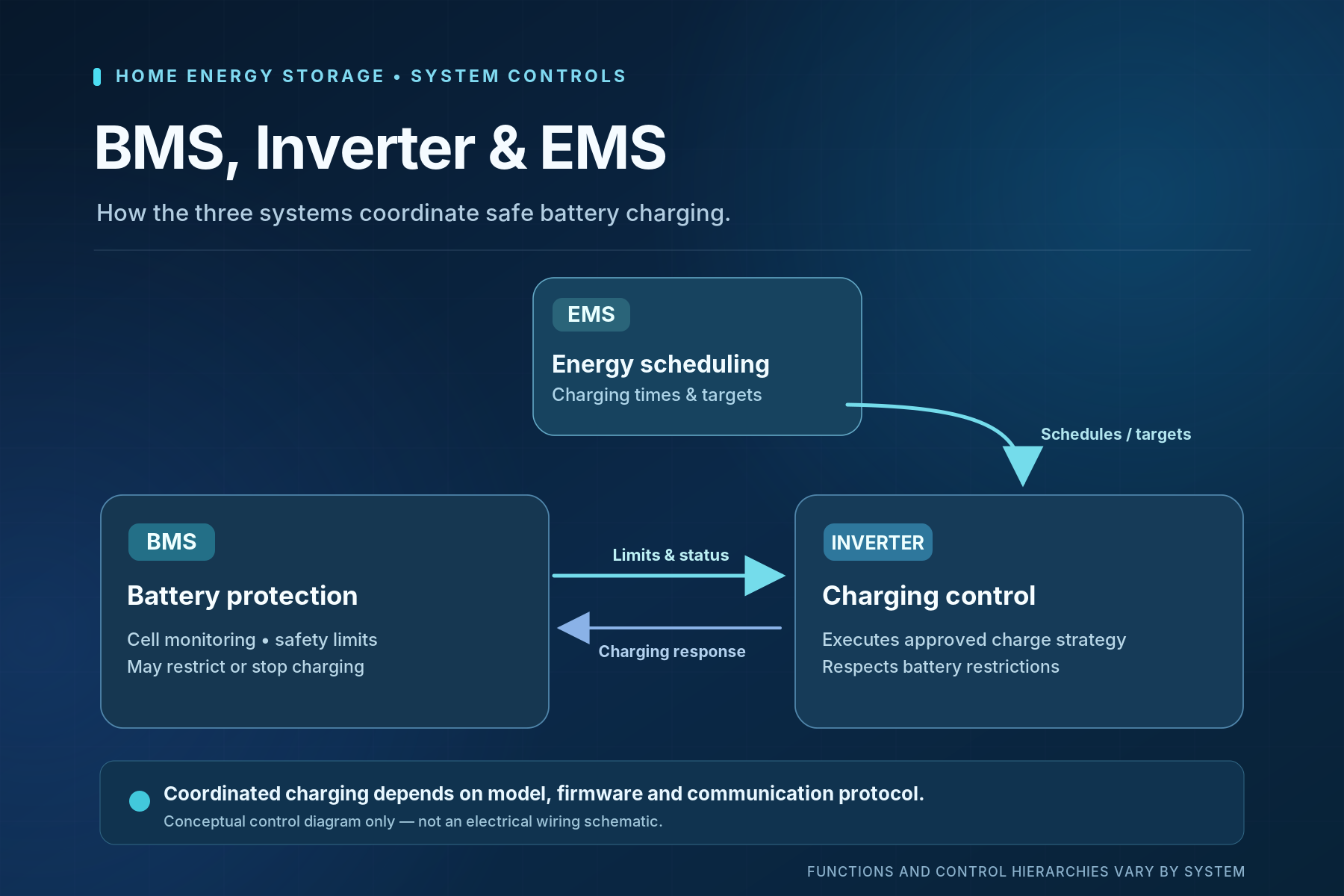
In a compatible closed-loop configuration, the BMS sends operating information to the inverter, and the inverter adjusts charging accordingly. For instance, an approved 90% target does not guarantee charging will continue until 90% if a temperature-related restriction intervenes.
Control hierarchy varies by model and protocol. Maximum charge SOC, minimum discharge SOC, and BMS protection thresholds are distinct.
If you need a broader explanation of the battery, inverter, and household energy flows, see How Does a Home Battery Storage System Work?.
Use only a charge-limit setting documented for your particular system. Do not substitute charger-voltage adjustments or protection-limit changes when a maximum SOC control is unavailable.
1. Identify the equipment. Record battery and inverter model numbers, firmware versions, and the approved SOC range.
2. Review existing settings. Note the current charge target, operating mode, backup reserve, and scheduled charging rules.
3. Check permissions. Confirm whether the displayed parameter really controls maximum charge SOC and whether user access is permitted.
4. Choose an approved target. Consider normal loads, backup requirements, and manufacturer-specified balancing or synchronization.
5. Save and document the change. Retain the original value and a screenshot or service record.
6. Observe a normal charge cycle. Review SOC, charging power, schedules, and alerts when enough energy is available to charge.
Menu labels vary, and an installer may need to approve changes.
Verification | What a Useful Check Shows |
Saved target | The intended approved value is retained |
Charging trend | Power reduces or charging stops in a manner consistent with system logic |
BMS and inverter status | No new communication or protection alerts |
Logs and operating mode | The observed result matches the active schedule and energy source |
The exact displayed stopping percentage may differ slightly from the configured target due to SOC estimation, control logic, or measurement resolution. One reading is not proof of a fault. Record persistent discrepancies and seek support; never bypass BMS protection.
Daily full charging is not automatically harmful, but time spent at high SOC can contribute to aging, particularly at higher temperatures. The effect varies with cell chemistry, battery design, and usage patterns.
Battery aging has two major components: cycle aging, associated with charge-discharge use, and calendar aging, which occurs over time even without regular cycling.
Research on LFP-graphite cells has shown that higher storage temperature and SOC can increase calendar-aging-related capacity loss, with temperature exerting a particularly strong influence under the studied conditions.
Charging Pattern | Why It Matters |
Briefly reaches a permitted full-charge condition, then discharges | Shorter time at the upper SOC range |
Reaches the upper limit and remains there for extended periods | Greater high-SOC exposure, potentially increasing calendar-aging stress |
This does not quantify any product's lifespan benefit. Displayed 100% need not mean the cells' absolute maximum SOC.
Temperature, charge/discharge current, depth of discharge, and cycling all influence degradation.
Avoid quoting a fixed percentage of extra life from an 80% limit without model-specific evidence. The practical objective is to reduce avoidable stress while meeting real energy needs and following approved charging requirements.
Some LFP systems require specific upper-charge conditions for cell balancing or SOC synchronization. The required frequency and procedure depend on the particular battery and BMS; reaching a displayed 100% does not always mean either process is complete.
Cell balancing reduces differences in charge state between individual cells so one cell is less likely to reach a protection threshold before the others. It does not restore capacity already lost through cell aging.
SOC synchronization is a separate process in which the monitoring system corrects its estimated charge level when defined conditions are met.
For example, Victron's Lithium Smart documentation describes balancing associated with specific charging conditions and absorption time. Those voltage and timing requirements apply to the documented Victron product, not automatically to ThinkVolt or every LFP battery.
What the Manual Says | Sensible Response |
A periodic full-charge procedure is required | Follow its stated trigger, duration, and approved charging limits |
SOC synchronization is required | Use the exact documented synchronization method |
No full-charge maintenance schedule is stated | Do not invent a universal interval; ask the manufacturer if uncertain |
For repeated imbalance alerts, contact your installer. Never raise voltage or disable protection as a shortcut.
A higher approved charging target may be sensible when an outage is likely or backup readiness takes priority over reducing time at high SOC. The goal is enough stored energy to operate essential loads for the required period—not necessarily the highest displayed percentage at all times.
Situation | Charging and Reserve Strategy |
Everyday solar self-consumption | Balance available energy for evening use with an approved charging routine |
Forecast outage | Where supported, prepare with a higher permitted charge target or authorized backup mode |
Ongoing backup priority | Maintain an appropriate reserve and confirm recharging capability and essential-load demand |
Maximum Charge SOC is a target or upper charging limit where adjustable.
Backup Reserve usually controls how much stored energy is withheld from normal grid-connected consumption so it remains available during outages.
A 30% reserve does not mean charging stops at 30%, and increasing a reserve does not necessarily trigger immediate charging.
Tesla's Powerwall documentation illustrates this distinction, but functionality varies across systems.
If a reserve setting is your main concern, see ThinkVolt's guide, What Backup Reserve Should You Set on a Home Battery?.
Before relying on a planned backup charge, verify the inverter's backup capability, approved SOC range, solar forecast, permitted grid charging, and power requirements of essential loads. Some installations lack these functions.
Stopping below a displayed 100% can be normal. The battery may have reached its permitted charging target, the EMS may be following a schedule, available solar energy may be insufficient, or the BMS may be limiting charging because of operating conditions.
Symptom | Possible Explanation | First Safe Check |
Stops consistently around 80–95% | Approved upper SOC target or operating range | Check the saved setting and model manual |
Charging slows or pauses | Temperature or BMS-controlled charge reduction | Review temperature readings and alerts |
Target is not reached on cloudy days | Limited solar surplus or household consumption | Compare PV generation, loads, and charging power |
Unexpected stop with an alert | Protection event or communication fault | Record fault code and BMS/inverter status |
Charges at unusual hours | EMS schedule or grid-charging mode | Check operating mode and timers |
Compare multiple charging cycles. Small SOC discrepancies may be normal; persistent failure, warnings, abnormal temperatures, or communication errors require installer review.
Do not force additional charging by changing voltage limits or defeating protective controls. Share the model details, operating conditions, timestamps, screenshots, and logs with the service team.
These common questions cover settings, compatibility, and service considerations that may not be obvious from the main charging guidance.
Not necessarily. The displayed percentage reflects the monitoring system's SOC estimate and the way the manufacturer defines the usable operating window.
Some systems include protective margins. SOC estimation can also drift over time, so the display is not a direct measurement of the cells' absolute electrochemical capacity. Use the model's documentation when interpreting readings.
Some systems support different operating schedules or charge targets for solar and grid energy, but not every inverter provides independent SOC limits.
Settings may depend on the EMS, firmware, operating mode, and local grid-charging rules. Confirm that the function is explicitly supported instead of assuming any scheduled grid-charging feature provides a separate maximum SOC setting.
Follow its existing manufacturer-approved strategy. Closed-loop battery-inverter systems may manage upper charging conditions automatically without exposing a user control.
Ask the installer whether an approved configuration option exists. Do not change charging voltage, disable communications, or alter BMS protection thresholds to imitate a missing SOC limit.
Only if the complete configuration is approved. Verify the modules' models, capacities, age or condition where relevant, firmware, BMS communications, and permitted connection arrangement.
Sharing the same nominal voltage does not prove compatibility. An installer should confirm the system-level charging limits before adding modules or changing the charging policy.
An approved setting does not automatically invalidate a warranty; coverage depends on the applicable terms.
Unauthorized parameter changes, operation outside specified limits, or bypassed protections may affect coverage. Check the warranty document for your model and obtain supplier confirmation when the permitted scope of adjustment is unclear.
No universal voltage adjustment safely substitutes for maximum SOC control. Voltage settings can affect charging behavior, cell balancing, and protective operation.
Use a documented SOC function if your system provides one. Where voltage configuration is genuinely required by the design, it should follow the exact manufacturer instructions and be handled by authorized personnel as appropriate.
Send battery and inverter model numbers, firmware versions, current charge targets, operating mode, and a short description of the problem.
Include screenshots or logs showing SOC, charging power, temperature, timestamps, and alert codes. Note whether charging was supplied by solar or the grid. This allows technicians to distinguish configuration issues from protection or communication faults.
Use a charging routine that respects the manufacturer's approved SOC window and maintenance requirements while providing enough energy for household demand and power outages. A lower target may reduce unnecessary high-SOC exposure; a higher permitted target may be justified by backup needs or a prescribed maintenance process.
Planning a home storage project or reviewing an existing installation?
Contact ThinkVolt with your battery and inverter models, proposed charging target, typical daily energy use, and required backup duration. Our team can review the application with homeowners, installers, system integrators, and distributors and discuss suitable battery configurations and charging requirements.